Save $10 On Your First Install. Use Code BLOG10
-min.webp)

Auxe is operating as an essential business
Save $10 On Your First Install. Use Code BLOG10
Protect your office with smart security camera solutions. Learn the best camera placement, monitoring, access control, and surveillance tips for workplace safety
By
Auxe
|
July 27, 2026


.png)

.jpg)
.png)
Protect your office with smart security camera solutions. Learn the best camera placement, monitoring, access control, and surveillance tips for workplace safety

Office security cameras can help protect employees, visitors, equipment, confidential information, and other valuable business assets. However, the effectiveness of a surveillance system depends heavily on where the cameras are installed. A high-quality camera placed in the wrong location may miss important activity. It may face direct sunlight, capture unclear images, leave blind spots, or record areas where people reasonably expect privacy. Good office security camera placement is not about installing a camera in every corner. It is about understanding how people enter, move through, and use the workplace. The goal is to monitor important areas while respecting employee and visitor privacy. This guide explains the best places to install office security cameras, common placement mistakes, privacy considerations, and the value of hiring a professional security camera installation provider.

Security camera placement affects almost every part of your surveillance system’s performance.
A properly planned system can help your business:
Poor placement can produce the opposite result. Cameras may capture the tops of people’s heads instead of their faces. Bright windows may make indoor subjects appear dark. Shelves, doors, decorations, or office partitions may block the camera’s view. Before installing any equipment, walk through the entire office and identify the areas where security incidents are most likely to happen.

The main entrance is one of the most important locations for an office security camera. Most employees, customers, delivery workers, contractors, and visitors enter through this area. A well-positioned entrance camera can provide a clear record of who entered the office and when they arrived. The camera should be positioned to capture faces, not only the general doorway. Avoid placing it too high or pointing it sharply downward. A camera mounted at a practical angle is more likely to record recognizable facial details.
When planning the entrance camera, check for:
If the entrance has strong backlighting, consider a camera with wide dynamic range. This feature helps balance bright and dark parts of the image.

Many offices focus only on the front entrance and forget about side doors, rear doors, loading entrances, and emergency exits. These access points can be attractive to unauthorized visitors because they may receive less attention. They may also be used by employees taking out equipment, packages, or other business property.
Install cameras where they can clearly monitor each secondary access point. The system should show both the door and the person approaching it.Do not position the camera so close that it records only a small part of the doorway. It should provide enough surrounding context to show where a person came from and where they went.
Emergency exit cameras should not block signs, alarms, lighting, or safety equipment.
A CCTV camera in this area can help document visitor activity, deliveries, disputes, unauthorized access, and incidents involving the front desk. It may also help reception employees feel safer when they are working alone. Position the camera so that it captures the reception desk, waiting area, and path leading into the office. However, avoid aiming it directly at computer screens, confidential paperwork, identification documents, or payment information. The purpose should be to monitor the space, not to record sensitive information unnecessarily.

Hallways connect different sections of an office. A person moving between the entrance, meeting rooms, storage areas, workspaces, and exits will often pass through one or more hallways. Camera Installation in these locations help create a timeline of movement during an incident. Even when an event does not happen directly in front of a hallway camera, the recording can help show who entered or left the area.
Place cameras near:
Long hallways may require more than one camera. A single wide-angle camera may provide an overview, but it may not capture enough facial detail at the far end of the corridor.
Server rooms may contain valuable equipment, business data, network systems, backups, and other critical technology. Unauthorized physical access can lead to theft, damage, downtime, or a serious data security incident. A security camera should monitor the entrance to the server room. In many cases, monitoring the doorway is more useful and less intrusive than placing a camera directly inside the room. Businesses can also combine video surveillance with access-control systems. This allows management to compare access records with video footage when investigating an incident. Make sure the camera does not create a security risk of its own. Recording devices, network connections, passwords, and remote access should be protected from unauthorized users.

Storage rooms may contain computers, office supplies, tools, products, records, spare equipment, or other valuable items. Cameras should capture the entrance and the main movement areas within the room. Avoid creating blind spots behind tall shelves or stacked boxes. Before mounting the camera, consider how the room may change over time. A clear view today may become blocked when new shelving or inventory is added.
For better long-term coverage:
Some offices have special areas containing expensive computers, media equipment, tools, demonstration products, laboratory devices, or company vehicles. These areas may require more detailed coverage than ordinary office spaces. One camera can provide a general view, while another can capture close details around the most valuable assets. For example, a camera covering a room may show that someone entered, but a second camera near the equipment may show what the person handled or removed. The number of cameras should be based on the risk, room layout, lighting, and level of detail required—not simply the size of the room.
Businesses that regularly receive deliveries should consider cameras for mailrooms, loading areas, package shelves, and shipping desks.
These cameras can help investigate:
The camera should capture both the person and the package-handling area. If possible, include the doorway or loading entrance in the frame. For loading docks, use outdoor-rated cameras that can handle changing weather, dust, moisture, and temperature conditions.
Offices that accept payments or handle cash need clear surveillance around transaction points. The camera should show the interaction between the employee and customer without recording confidential details such as PIN entries, complete payment card information, passwords, or private documents. A general overhead view may provide context, while a properly angled camera can help identify the people involved. Before installing cameras in financial or payment areas, review the placement carefully to ensure the system improves security without collecting unnecessary sensitive information.
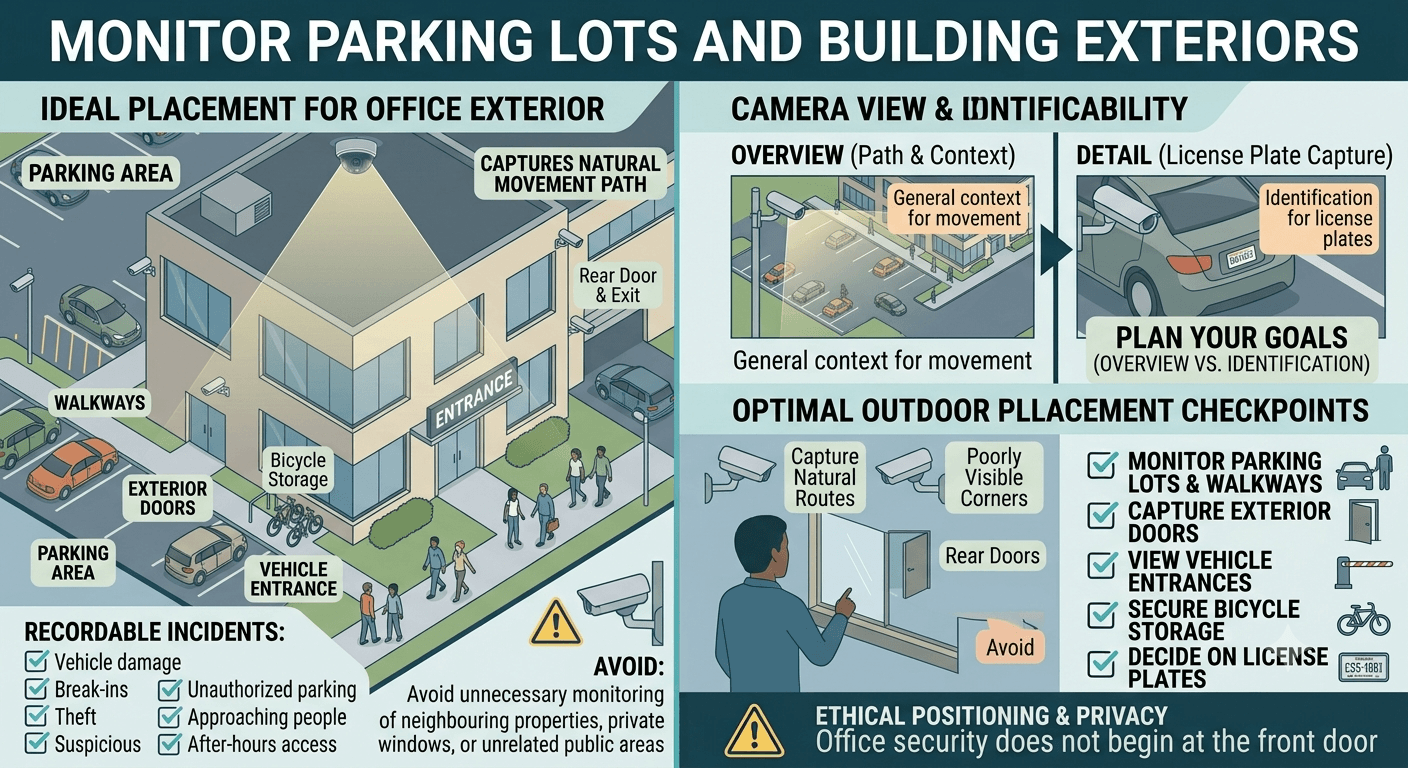
Office security does not begin at the front door. Parking lots, walkways, exterior doors, bicycle storage areas, and vehicle entrances may also need protection.
Outdoor cameras can help record:
Position exterior cameras to capture natural movement routes. Important locations may include the path from the parking area to the entrance, vehicle entry points, rear doors, and poorly visible corners. When monitoring vehicles, decide whether you need a general overview or enough detail to identify licence plates. These are different goals and may require different camera positions, lenses, or dedicated licence-plate cameras. Avoid pointing cameras unnecessarily toward neighbouring properties, private windows, or unrelated public areas.
Stairwells and elevators can be isolated, especially outside normal working hours. Cameras near these areas can improve safety and help track movement between floors. For elevators, cameras are often placed near the doors so they can capture people entering and leaving. Installing a camera inside an elevator may involve additional building rules and privacy considerations, so this should be reviewed before installation. In stairwells, make sure the camera can handle changing light levels and does not interfere with emergency lights, fire equipment, or exit signs.
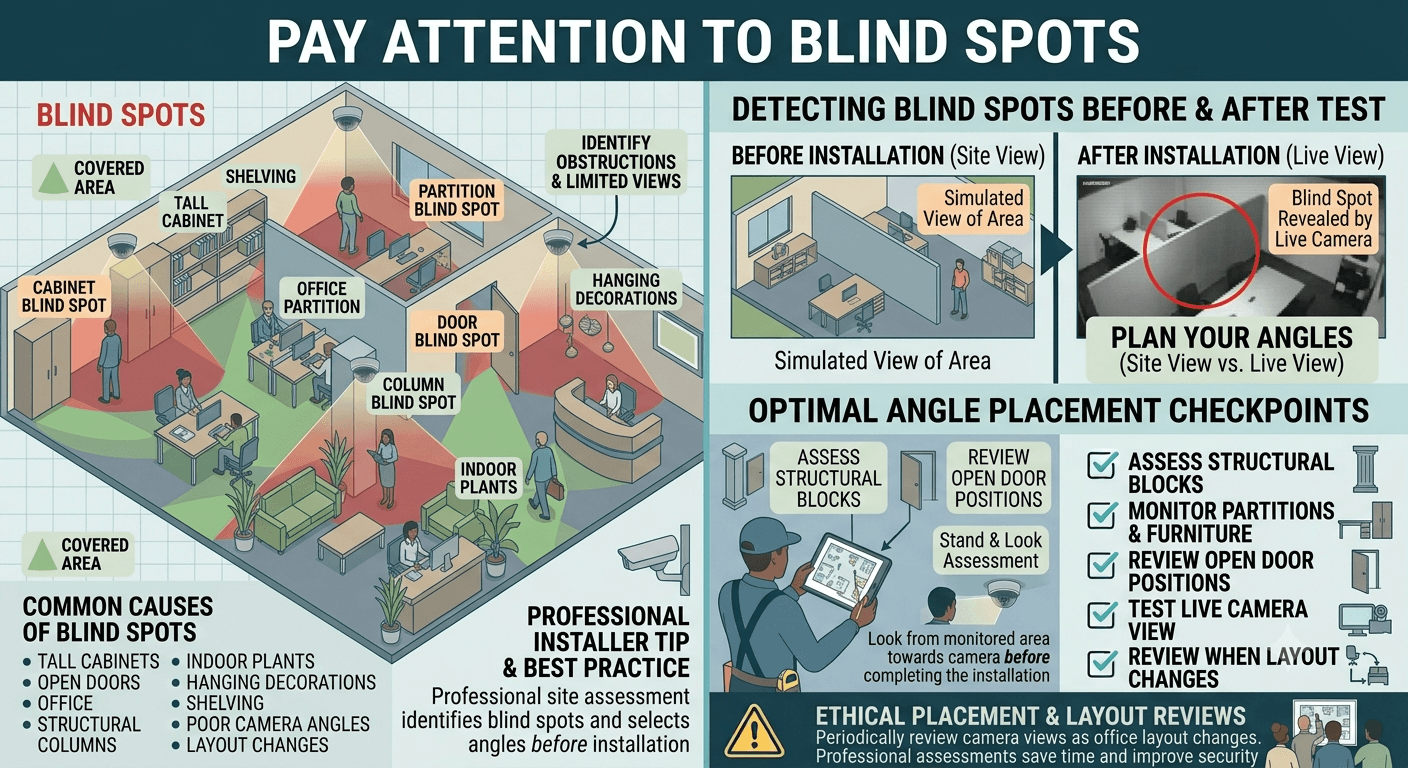
A blind spot is any area that should be visible but is blocked or falls outside the camera’s field of view.
Common causes include:
Stand in the monitored area and look back toward the proposed camera location. Then test the live camera view before completing the installation.
Professional installers often perform a site assessment to identify blind spots and select appropriate camera angles before running cables or permanently mounting equipment.
Mounting a camera very high may protect it from tampering, but it can also reduce the amount of useful facial detail captured. A camera placed too low may be easy to reach, damage, cover, or redirect. The right mounting height depends on the camera lens, ceiling height, room layout, and surveillance objective. Entrance cameras usually need a practical facial angle, while overview cameras can be placed higher to cover a wider area.
A professional installation should balance:
There is no single perfect height for every office.
A camera may look excellent during the afternoon and perform poorly at night. Office lighting changes throughout the day, especially near windows and exterior doors.
Test camera views during:
Avoid pointing cameras directly at windows, bright ceiling lights, reflective walls, or computer monitors. For dark locations, choose cameras with suitable low-light or infrared performance. However, infrared light can reflect from glass, shiny surfaces, and nearby walls, creating a washed-out image.

A wide camera view covers more space, but people and objects may appear smaller. A narrow view captures more detail but monitors less of the room. Each camera should have a clear purpose.
Ask what the camera needs to record:
Trying to make one camera perform every task can produce weak results. In important locations, using separate overview and identification cameras may be more effective.
Office cameras should not be installed in places where employees or visitors reasonably expect a high level of privacy.
Avoid cameras in areas such as:
Extra care is also needed around employee break areas, private offices, meeting rooms, and workstations. Canadian privacy guidance emphasizes balancing an employer’s legitimate security needs with employee privacy. Employees should understand how their information is collected and used, and access to employee information should be limited to people who genuinely need it. Privacy requirements can vary by province, industry, workplace type, and the purpose of the surveillance. Businesses should review the rules that apply to their organization before activating a camera system.
Employees should not unexpectedly discover that they are being recorded.
Create a written workplace surveillance policy that explains:
Visible signs should also notify employees and visitors that video surveillance is in use. The Office of the Privacy Commissioner of Canada has stated that workplace video surveillance should include sufficient signage and that employees should be informed about the purposes for which recordings will be used. Do not enable audio recording without carefully reviewing the applicable privacy and consent requirements. Audio can raise additional concerns beyond video-only monitoring.
Camera placement is only one part of office security. The recordings must also be protected. Use strong, unique passwords and avoid leaving the manufacturer’s default login details active. Limit administrator access and provide viewing permissions only to authorized users.
Depending on the system, useful protections may include:
The recorder should not be placed in an open area where anyone can unplug, damage, or remove it. NVR and DVR equipment is often installed in a secure cabinet, server room, or restricted utility area.
Businesses sometimes choose a recording period without considering how long it usually takes for an incident to be reported.
The correct retention period depends on:
Keeping footage indefinitely may create unnecessary privacy and security risks. A business should define a reasonable retention schedule and securely remove footage when it is no longer needed, unless it must be preserved for an investigation or other legitimate purpose.
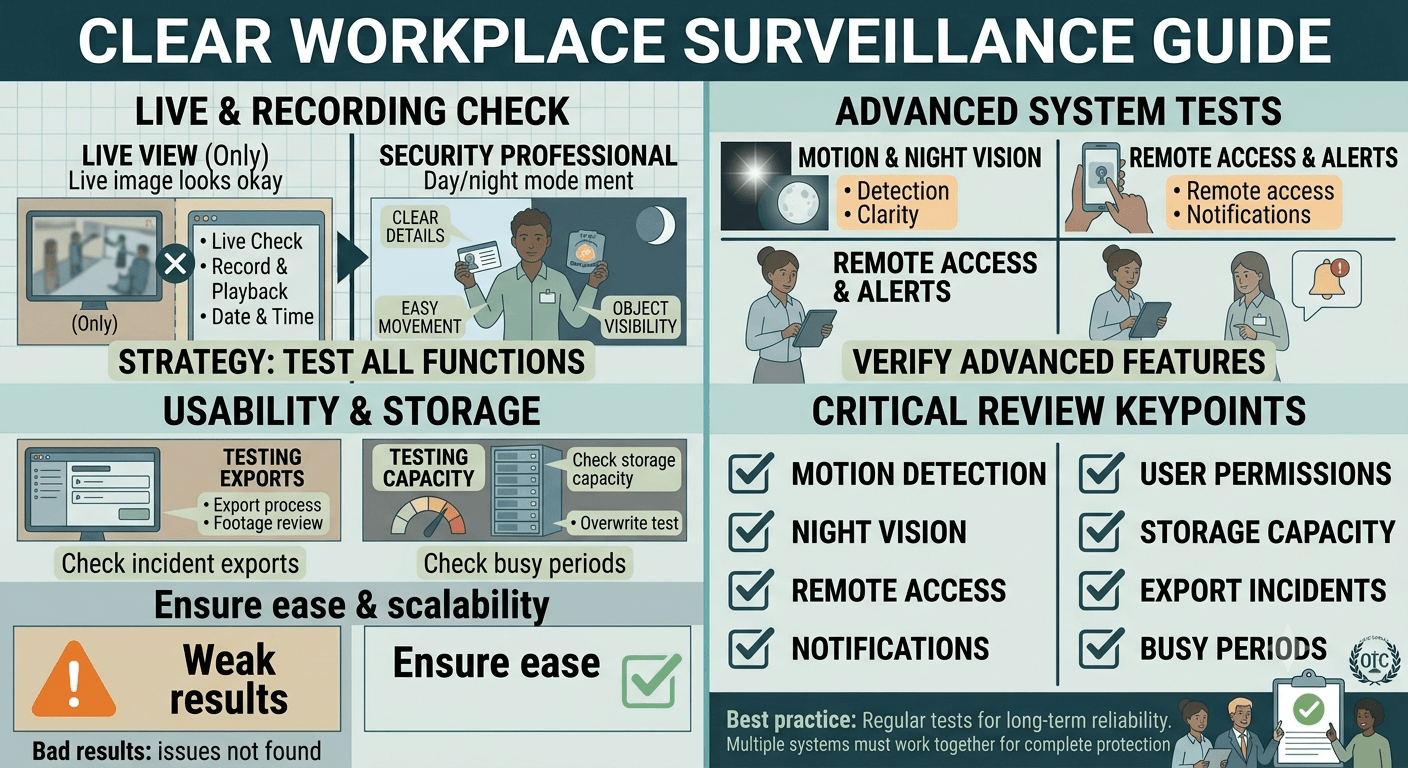
Never assume a camera is working correctly simply because its live image appears on a screen.
Test:
Walk through each monitored area and review the recording. Check whether faces are clear, movement is easy to follow, and important objects remain visible.
Repeat the test at night or after normal office lighting has been turned off.

Very high cameras may provide an excellent view of the room but poor facial images. This can make identifying a person difficult.
Bright outdoor light can cause people inside the office to appear as dark silhouettes.
One wide-angle camera may show general movement but miss important details.
A door may block the camera’s view whenever it is open. Test all doors during the placement process.
New furniture, partitions, displays, or shelves can create blind spots.
Indoor cameras may not be protected against rain, snow, moisture, dust, or Canadian temperature changes.
A camera that performs well during office hours may produce unclear images after the lights are turned off.
An accessible recorder can be unplugged, damaged, or stolen along with the footage.
Cameras should have a defined security purpose. Unnecessary monitoring can create privacy concerns without meaningfully improving protection.
Both wired CCTV and Wi-Fi-based camera systems can be useful, but they serve different needs. Wired systems are often suitable for offices that need dependable, continuous coverage across several cameras. They may use a DVR or NVR to store recordings locally. Wi-Fi cameras may be practical in smaller offices or locations where running new cables is difficult. However, their performance depends on network coverage, bandwidth, configuration, power, and cybersecurity. AUXE offers installation for both wired CCTV and Wi-Fi-based security camera systems, allowing the setup to be matched to the property and business requirements.
Office camera installation involves more than attaching cameras to walls.
A professional installer can evaluate:
Professional installation also helps create a cleaner result. Cables can be routed and secured properly, cameras can be mounted safely, and the system can be configured and tested before it is handed over. This is especially important for offices with multiple floors, restricted rooms, concrete walls, outdoor areas, large parking lots, or several camera types.
A well-designed office security camera system should provide useful coverage without creating unnecessary blind spots, poor-quality recordings, or privacy problems. AUXE provides professional CCTV and security camera installation for businesses that need a dependable, carefully planned surveillance system. AUXE supports wired CCTV and Wi-Fi camera installations, professional cable routing, recording-system setup, and camera configuration. Instead of guessing where cameras should be installed, an experienced technician can assess your office, identify high-risk locations, recommend suitable equipment, and position each camera for better coverage. For professional office security camera installation, contact AUXE to discuss your property, security concerns, camera requirements, and installation options.
Important locations include main entrances, secondary doors, reception areas, hallways, stairwells, server-room entrances, storage rooms, shipping areas, parking lots, and exterior access points. Final placement should be based on the office layout and security risks.
It is generally better to monitor entrances, movement routes, restricted areas, and valuable assets rather than continuously focusing on individual employees. Any workplace monitoring should have a clear purpose and follow applicable privacy requirements.
Break rooms can involve higher privacy expectations than public or access-control areas. Before placing a camera there, consider whether the security objective can be achieved through a less intrusive location, such as monitoring the entrance. Review applicable workplace privacy rules first.
The number depends on the office size, layout, number of entrances, important assets, lighting, camera field of view, and required image detail. A professional site assessment is the best way to calculate suitable coverage.
Wired systems often provide stable connections and are commonly used for larger, permanent installations. Wi-Fi cameras may work well in smaller or difficult-to-wire spaces. The best option depends on the building, network, security needs, and budget.
Continuous recording offers complete coverage but uses more storage. Motion-based recording reduces storage use but may miss activity if it is not configured properly. Some businesses use continuous recording in high-risk areas and motion recording in lower-risk locations.
Review the system regularly and after any office renovation, furniture change, network update, power issue, or security incident. Confirm that every camera is online, properly aimed, recording, and displaying the correct time.
AUXE provides professional security camera installation for wired CCTV and Wi-Fi systems. Professional planning can improve camera coverage, cable management, recording reliability, system configuration, and long-term usability.


.webp)
Our online price calculator is free and requires no credit card, email, or contact information. Check it out!
Our online price calculator is free and requires no credit card, email, or contact information. Check it out!

%20(1).png)
%20(1).png)
.png)
.png)
.png)
.png)
.png)
.png)
.png)
.png)
.png)
.png)
.png)
.png)
%20(1).png)
%20(1).png)
%20(1).png)
.png)



.webp)


.webp)
%20(1).webp)